Showing posts with label step by step. Show all posts

Sunday, 1 December 2013

I can...say it with a simple SGD!

Do you own a single or sequential messaging device (SGD)?  Be honest, when was the last time you used it?  Do you need some new ideas to dust off that device and get it up and running again? Simple SGDs can be used for a variety of reasons including sharing news, asking a question, making a comment, cheering for your team etc.  We've scoured the Internet and gathered all of these useful suggestions to allow kids who use AC to increase their active participation.


What are single or sequential messaging devices?  
Single message devices allow one message to be programmed in at a time.
Sequential message devices allow multiple messages to be programmed in one at a time.  
Check out PrAACtical AAC's post for more information on sequential messaging devices. 

Examples of Single Message Devices:  

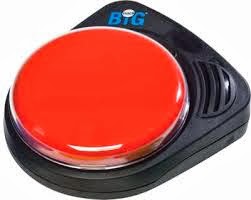
BIGmack Speech Device/LITTLEmack Speech Device by Ablenet
Big Talk Communicator by Enabling Devices


Spectronics comparison of Ablenet Single Message Devices:
http://www.spectronicsinoz.com/article/ablenets-single-message-communicators-comparison-chart

Examples of Sequential Message Devices

Small and Big Talk Sequencers by Enabling Devices
Sequencer by Adaptivation


Setting up for Success
Here are some tips to help make using a simple speech generating device easy.

1.  Make sure the device is easy to find when you need it.  Generally, if you can get a message on a device and ready to use in 30 seconds, you're more likely to help your child catch the moment.  Caroline Musselwhite, experienced assistive technology specialist refers to this principle as the "30 second" rule. Show everybody  how to put a message in the device so that no opportunities are missed.
Here are two videos by Ablenet demonstrating how to record on a Big Mack and Step by Step.  Written instructions are also located at the bottom of most devices.

Big Mack Communicator:

 Step by Step Communicator:


2. Involve your child when deciding what message(s) to record on the device.  If possible, provide choices of messages to share e.g. "Do you want to say 'Good morning how are you today?' or 'Hey, Is it Friday yet?' "
3.  Record the message from the child's perspective "Guess where I went last night?, I went to see Elf" vs. "Elizabeth went to see Elf last night".  When you are able, ask a child of the same gender and similar age to
record the message so the voice is fitting.

4.  If you need to prompt your child to share their message, focus on the communication rather than the access.  For example: "I think Beth has something to share with us" instead of "hit your switch".

5.  Acknowledge the message by reflecting back what you've heard and expanding on the information given.  "You're right, Jordan it's Wednesday.  We are going to do some cooking this afternoon."

6.  When your child is using a sequential speech generating device, it may be helpful to include an indication that there are no more messages to share e.g. "that's all for now". 


When can I use simple speech generating device?
  • Look for natural opportunities throughout your child's day where they can actively participate in what's happening around them.
  • Greeting visitors to the classroom
  • Wishing someone happy birthday
    • Regularly occurring activities also provide your child with the chance to join in.
      • Reading with a classmate
      • Jokes. Can't think of any good jokes?  Here are helpful lists from PrAACtical AAC.
      • Sharing news
      • Participation in circle time - talking about the weather, day of the week
    • In situations where it's not possible to take a complex SGD, using a simple SGD that allows you to quickly and easily add a message may be a better fit.
      • school trips
      • community outings
      • sports events
    • These devices are often useful for activities in which the primary goal is participation. 
      • Lines for a play, a speech or announcements can be recorded on a simple speech generating device as it's not likely that they will be used in communication at a later date.  The use of simple speech generating device can also simplify the physical access so that a child can be successful when they are in the spotlight.

    • Sometimes it's fun to be the leader.  Record the sequential instructions for an activity e.g. baking, painting or a scavenger hunt.
    Here are some other great ideas to make use of a simple SGD.
    101 Ideas for using the bigmack or other single message communication device  by Spectronics


    Monday, 1 September 2008

    I can...get organized!

    Welcome back! A brand new school year…a great time to encourage students to become more independent by keeping themselves organized!  There are all kinds of ways that we can help our students to keep track of their schedules and to remember what tasks need to be completed.

    Here are some vocabulary suggestions for getting organized:
    Let’s start a timer!
    Where’s my visual schedule?
    I’ll check my day timer.
    Let’s record that in my Step by Step ™
    Can I help check it off?
    Can you add that to my reminder list?
    Here’s our grocery list….
    Can you record a reminder in my Step-by –Step ™ for my mom?
    Is it time for lunch yet?
    Do you want to hear what I did at school?
    What do we need to take on our class trip?
    Let me tell you about my summer vacation…


    Visual Schedules  
    • Encourage a student who uses an SGD to remind the class of upcoming events or the daily schedule. Use this in combination with a visual schedule in your class to help remind all students of what’s coming next. To make a visual schedule more manageable, split it into a morning and an afternoon section. Show a book buddy how to use a visual schedule, so that your student can see it being used by many different communication partners. Remember that a visual schedule is not just a classroom decoration! It needs to be used frequently so that the student can learn the sequence of events throughout a given time period.
       
    No-Tech Ideas 
    • Post-It® Notes are great for reminders, adding temporary information to a communication display or as a communication exchange (a series of messages on subsequent notes)

      
    Light Tech Ideas
    • Use a student’s Step-by-StepTM to add a reminder for home. Make it part of the overall daily message, so that the social function of the device is not lost. “Hi Mom & Dad! I had a great day today. We listened to a story about Fall and watched a puppet show. Don’t forget I need to bring in some indoor shoes for gym tomorrow.”

      High Tech Ideas


    ·         It may be difficult to know whether a student has certain vocabulary within his SGD. Many of the device manufacturers provide support materials that can assist facilitators who want to model language for the student, e.g. wall charts, vocabulary lists and copies of the symbol sets for printing. Ask your ACS therapist to help you find the resources that you need.

    ·         Many high tech devices have integrated e-mail capabilities, reminder functions and address books that might be helpful to a student. Check the manufacturer’s website or ask your ACS clinician for information.


    Resources for families and educators: Check out the following websites for great ideas…

    For older students, Hutton House has developed a series of age appropriate books http://www.huttonhouse.com  


    Sunday, 1 June 2008

    I can...keep in touch!


    As the school year draws to a close, students may want to keep in touch with all their friends over the summer vacation. Today there are so many ways kids can connect including e-mail, letter writing, text messaging, Facebook and using the telephone. Students who use augmentative communication may need some help to use these methods effectively.

    Here are some vocabulary suggestions for talking about keeping in touch:
    What’s your e-mail?
    Are you on Facebook?
    We’ll be BFF!
    I’ll send you a postcard
    Give me a call over the summer.
    Write back soon!
    Do we have stamps?
    Do you have a cell phone?
    I’ll post my vacation pictures
    Help me write a letter.
    What’s your Facebook status?
    Keep in touch!


    Get Connected!

    Ability Online is a free and monitored online support community that links kids with disabilities or illness to other kids and adults who care.   It also provides information on health related issues.  You must register online and then you will be sent a password via Canada Post. 

    E-mail  
    Help students create an address book so that they can exchange e-mail addresses to keep in touch with their friends over the summer.
    • If a student has difficulty with spelling while composing an e-mail, try using symbols to help them choose which message to send to a friend. For example:
     

    Send an E-Card
    Students can send each other e-cards using Mayer Johnson’s website.  Browse by topic such as birthday, missing you etc.  http://www.mayer-johnson.com/ECard.aspx?DirID=Thinking%20of%20You

     
    No-Tech Ideas
    Try creating a remnant book or journal of the summer holidays so that students can share their memories. 

    Light Tech Ideas
    Collect vacation photos and display them in a talking photo album. 

    High Tech Ideas
    • Students who use voice output devices can talk on the phone too. Try programming a few phrases to let the person receiving the call know that the speaker is using a voice output device.
    • Ask your students to report on their summer vacation once they return to school. They can share their stories with the rest of the class by using their communication device.
    Resources for teachers and educators: Check out the following websites for great ideas…
    • The AC On-Line User's Group is an Internet Listserv which allows users of AC and their families to communicate with each other and with professionals who are interested in AC. Don’t know who to write to? Try hooking up your students with a pen pal. Check out this website for more information. http://www.theteacherscorner.net/penpals/

    Tuesday, 1 April 2008

    I can...take care of myself!


    As kids get older, they need to take more responsibility for taking care of themselves. Providing them with the vocabulary and opportunities to practice directing their own care and managing their needs will help them become more independent.

    Here are some vocabulary ideas for self care:
    I need a new haircut!
    Do I have to visit the dentist?
    Do I have to get a needle?
    I’m nervous
    I need to book a taxi
    I need to buy some groceries
    Will it hurt?
    Can you help me make a list?
    Can you help me?
    What are the side effects?
    I need to make an appointment
    I have an appointment
    I consent to this treatment
    Can you explain that again?
    Let’s go shopping


    Strategies for a Successful Appointment

    ·        Often health professionals have limited time during appointments.  Call ahead to book a longer appointment and to explain what communication strategies a person may use.
    ·        Try bringing this brochure with you on your appointment to help provide some general information on ways to communicate with someone who uses augmentative communication.  
    ·        Create a custom communication display specifically for the appointment or community outing you have planned.  Check out this website for some examples of boards that can be used at the hospital: http://www.speakingofspeech.com/uploads/Hospital_1.pdf
    ·        If you are using a device, ensure that it is charged!  If possible, print out any pre-programmed questions you might have.  If using low-tech, bring some back up batteries. 
    ·        Encourage your student to practice making appointment over the phone.  Try role-playing with a familiar listener.  Be sure to include clarification messages such as “I have difficulty talking.  I use a device to communicate.  Please be patient.”

    Light Tech Ideas
    • Student can use a Step by Step™ to introduce themselves to people they meet in the community.
    • Designate a student to be in charge of a shopping list. Try recording the list on a Step by Step ™. Voisec Talking Buttons can be used to record reminders for taking medications, remembering appointments etc.

    Resources for teachers and educators: Check out the following websites for great ideas…

    Saturday, 1 March 2008

    I can...get involved in music!


    Listening to music, playing an instrument, cheering for the next Canadian Idol. Music is all around us. Students who have disabilities can get actively involved in all aspects of music, from shaking the maracas to composing songs.


    Here are some vocabulary ideas for music activities:

    Let me play it!
    Have you heard the song….?
    I want to sing…
    Turn it up!
    I’m the next Canadian Idol!
    Who’s your favourite band?
    It’s too loud!
    Do you watch Don’t forget the Lyrics?
    Can I choose an instrument?
    Play it again.
    What do you want to sing next?
    Can I listen to my iPod?
    Change the CD
    My favourite song is….What’s yours?
    I love this song

    No-Tech Ideas
    • Make a symbol board for students to make choices during music activities such as choosing song verses or choosing which instrument to play.
    • Make a symbol board for students to talk about music with their peers. Try including questions such as “Who is your favourite band?”, “Did you watch Canadian Idol last night?”
    • Use a Post-it ™ note to keep a communication board current. Include a weekly update about a recent music event such as “Can you believe ….got kicked off the show?”
    Light Tech Ideas
    • Have your student start a song with a recorded intro line on a single message device e.g. “Old McDonald had a farm…”, “Swimming, swimming in the swimming pool…”

    High Tech Ideas
    • Some high tech communication devices have built in MP3 players. Contact your ACS clinician if you would like to explore this further

    Friday, 1 February 2008

    I can...go out and about!

    Exploring the community is fun for everyone. Try planning a field trip and encourage your students to participate in the preparation as well as the event itself. Students can also share their adventures by taking pictures and talking about them in a variety of ways.

    Here are some vocabulary ideas for your student to use while out in the community:
    Are we there yet?
    I need to go to….
    Are we taking the bus?
    Where are we going?
    Can you guess where I went today?
    I need to call a taxi
    I’d like to order a…
    Do we have to go home already?
    Let’s take a picture
    That’s amazing!
    It’s your turn to choose where we’ll eat
    Watch out for the….
    I’m lost!
    Can you help me pack my bag?
    I need some water
    Here are some suggestions for making your trip out in the community a success:

    • Role Play - Talking about an upcoming trip with your students can help them prepare for the different places they will visit and people they might meet.  For example, if planning a trip to the mall, be sure to make a list of items you are looking for.  Try role-playing to give students a chance to use some of the phrases they might use while on their trip.
    • Educating Others – When taking your students out to a new place, call ahead to find out when there may be a quieter time so that students who use Augmentative Communication can be more successful in their communication. Share information with people in the community on how best to communicate with someone who uses Augmentative Communication.   
    • Review vocabulary on your student’s device or communication display – Brainstorm the situations in which the student may want to communicate.  Try using the vocabulary available and then add additional vocabulary that might be needed. For example, in a trip to the bowling alley a student may want to say “Strike!”, “Spare!”, “Gutter ball!”.
    •  Sharing the experience – Try to provide your students with the opportunity to tell others about their recent field trip.  Be sure to include some questions for the listener to help draw them into in the conversation.  For example, after a trip to the zoo a student may ask someone “What’s your favourite animal?”

    No-Tech Ideas  

    • Take digital photos so that students can share their experience. 
    • Remnant Book – collect souvenir items such as a coaster, a movie ticket, a flyer etc and display in a small photo album. Students can then share information about where they have been visiting.

    Light Tech Ideas
    • Try choosing a student to act as a “reporter”. Record the events on a Step by Step™ and ask the student to report the field trip highlights.
    High Tech Ideas
    • Use digital pictures to create an electronic book. Try using Powerpoint™, Intellitools or Clicker to display the pictures. These books can be set up for switch accessibility. 

    Tuesday, 1 January 2008

    I can...perform!

    Lights, camera, action…kids love to perform! There are many ways for kids with disabilities to get involved in singing, dancing and acting opportunities at school.

    Here are some ideas for vocabulary for your student when performing:
    Let’s sing…
    I want to wear….for a costume
    I want to be….character
    From the top!
    Action!
    Sing it louder!
    Cut
    Please help me move (stage left/right)
    One more time
    Take a bow
    No autographs please
    Let’s listen to music
    Break a leg
    I want to play….instrument
    Was I good?


    SING!
    • Kids can participate by making choices between songs or even choosing which verse will be next. 
    • Song boards provide visual support through symbols and pictures.  This allows students to actively participate in the song.  They can be created for songs you use in your classroom.  There are also some ready-made song boards for younger students.
     ACT!
    • By recording lines on a voice output communication aid (VOCA) kids can say their lines in a play. 
    • When performing, timing is very important to the flow of the play.  It should be as easy as possible for kids to access their device – consider this when customizing the messages on a device. 
    • A student may use a different access method or page set up while acting.  Some kids will need some extra help from a partner who can help them know when it’s their turn to say their line. Try colour-coding lines to make prompting easier.
    DANCE! Kids in wheelchairs can be included in dancing and performing with a little help from their peers.  See the story of Rebecca Beayni for inspiration.  http://www.rebeccabeayni.com/RevelintheLight.html


    No-Tech Ideas
    • Writing a Play – Try adapting a favourite story into a play.  Choose a story with enough characters for your students.  Try to ensure that all participants have a fairly equal number of lines to say. 

    Light Tech Ideas
    • Every play needs sound effects! Record different effects onto single message devices for use throughout the play.
    • The first line of a song or a chorus can be recorded onto a single message device – the student decides when the singing begins.


    High Tech Ideas
    • If your student uses scanning, try to program the device to link between pages to speed up access to lines.
    • Be sure to test the volume and clarity of the device in the room the play will be performed.
    • Devices with recorded speech are often easier to understand in a play.  It also allows for added expression when recording the lines.
    • If your student has a high tech device, they may be able to use the device to sing a song. 
     Resources for teachers and educators:

    Check out the following websites for great ideas:
    • Songs for Kids http://www.kididdles.com/
    • For help programming a song using a Dynavox product enter in the word “singing” into their Knowledge Base 

    Saturday, 1 December 2007

    I can..write!

    Often, kids with physical disabilities do not have many opportunities to engage in writing activities.  There are many ways to adapt activities to allow active participation in writing. Here are some ideas to get your kids excited about writing: make a wish list for Santa or a birthday, write a journal or online blog, write a story about an imaginary place, write a funny poem, write an email to a friend, keep a Facebook page updated.


    Here are some ideas for vocabulary your student might use when writing:
    I want to write to….
    Can you print this for me?
    Let’s add a picture
    I want to write more
    Let’s send this in the mail.
    I want to email
    I want to write about...
    Can you read it back to me?
    This is a great story!
    How do you spell…
    What do you think of my work?
    Let’s make a list
    Can I check my email?
    Let’s go to my Facebook page
    Dear Santa,

    Building A Story
    • Try using symbols to create simple stories with a beginning, middle and end. Give your students the opportunity to choose from a selection of story starters, plots and conclusions. Below are some examples to get you started. Based on your student’s reading ability, you can choose to use symbols or just text. See additional examples in the “I Can” resource package attached.
    • Try making multiple copies of the symbols/text. As a student makes a selection, provide them with a copy for them to paste on a paper. At the end, the student will have a hard copy of their story.

    Story Starters
    Story Plots
    Story Conclusions
    Once upon a time
    a dragon breathed fire on all the land
    and he was chased out of town and never seen again.
    In a land far, far away
    a princess found a frog
    and everyone lived happily ever after.
    One dark and stormy night
    a monster was wandering the streets
    and changed into a beautiful unicorn.
    In the middle of stinky wet swamp,
    a caterpillar ate a monstrous mushroom
    and sailed away across the ocean.

    Make a Big Book
    Have your older students create simple patterned stories that are often used for young children.  Provide an opportunity for your student to share this book with younger students or show it off with their reading buddy. 

    No-Tech Ideas
    • Fill in the story – Write simple sentences. Encourage your students to make choices to fill in the blanks. E.g. Michael likes to ______. (Swim/Eat/Drink/Dance/Jump)
    Light Tech Ideas
    • Try recording a story that your student has written onto a Step-by-Step™ communicator so that your student can re-tell the story to friends, family and others.
    High Tech Ideas
    • Students need access to a wide variety of vocabulary for writing. Often students who use a speech-generating device have only one word to express an idea or concept, e.g. “happy”. Give them access to a large and rich vocabulary bank. For example, instead of saying “happy” your student may want to say “excited”, “thrilled”, “elated”, “jumping for joy”, “energized”.
    • Provide your student with vocabulary on their speech-generating device to allow them to meet their daily writing goals.
    • Students may use adaptive software programs such as Intellitools Classroom Suite, Clicker, or Writing with Symbols. Check out the manufacturer’s website for an extensive list of activities to download.


    Thursday, 1 November 2007

    I can..read a book!


    Everybody loves to read books!  Book reading is more fun when you can fully participate by talking about the book, turning the pages and reading some of the lines. 

    Here are some ideas for vocabulary when reading books with your student:
    Let me see
    Turn the page
    Read it again!
    I want another book
    I want a different book
    Read some more
    That was a good story
    I want to read with…
    Let me see that picture
    I can’t see the pictures
    Where’s my reading buddy?
    I love this book
    That’s scary!
    I don’t like that story
    I want to read…
    That’s silly
    Can I read a book on the computer?
    It’s my turn to pick
    Let’s go to the library
    Let’s check out a….book
    What happens next?

    How to Adapt a Book


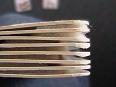
    Page Fluffers: Adding pieces of foam, weather stripping or sponge to the corners of a book may help a student to turn pages independently.


    Adding Picture Communication Symbols (PCS) from Boardmaker™
    Add PCS symbols to simplify the text in a book.
    Add PCS symbols to make requests while book reading e.g. “Turn the page”, “Read it again”.

    Velcro™ On Covers: Place "male" Velcro™ (rough, sticking out surface) on the back cover of children's books. The Velcro™ strips will adhere to carpet so that the book won't slip and slide while the child is turning pages

    Go on a Library Fieldtrip All of London’s Public Libraries participate in the “Libraries for All” initiative. Alphabet, word and picture boards are available at all branches. For more information contact Linda Ludke at the Public Library. Linda.ludke@lpl.london.ca


    No Tech Ideas: 
    • Create a general display for all book-reading activities.  Try using the display provided in the “I Can…read books” resource package.
    • Create a specific display to allow your student to comment on the characters and story plot. 
    • Kids are often motivated by stories in which they are the central character.  Create personalized stories about your student using digital photos.
    Light Tech Ideas
    Use a BIGMack® to allow students to make requests e.g. “Read some more”, “Turn the page”
    Encourage students to actively participate by saying the repeated line(s) in a story. A list of suggested books with repeated lines is included in the “I Can…read books” resource package.

    High Tech Ideas
    Program a story into a Voice Output Communication Aid (VOCA) so that your student can read a story to a reading buddy or younger student.