Showing posts with label acting. Show all posts

Thursday, 10 September 2015

I can...stage a production!

Kids love to perform! These days there are lots of community theatre camps that give kids of all ages the chance to get up on stage and step into the shoes of another character for a short while. Being part of a stage production creates an opportunity to develop all kinds of skills including increasing confidence and self esteem, learning about team work and knowing how to handle feedback. It's also a great way to make new friends! And most of all, it's about having fun! In London, Ontario, there was a summer theatre camp for kids who use speech generating devices. Our experiences led to many changes over the years - here's an overview of our theatre journey!

The beginning...
Our story began at TVCC in London Ontario, where a Recreational Therapist had the inspiration to plan a theatre experience for some of the youngsters who were using speech generating devices to communicate. The Augmentative Communication Service (ACS) stepped in for technical support (and because it was a lot of fun!) and the dream became a reality. Short plays were performed for delighted families on the stage at the Centre. 'We should do this again' we all thought...

The Partnership:
The following year, a partnership with the local Original Kids Theatre Company was formed. The local theatre was made available for a week in the summer for us to use. The kids had enjoyed performing at TVCC, but this gave them the experience of being in a real theatre, with access to everything that makes for an authentic experience: the stage, lights, costumes, props, music and sound effects. A group of volunteers was engaged from the Original Kids company. These teens had experience of being with the company over a number of years and some leadership experience. Each year they applied to volunteer at the camps and attended an interview to make sure that this was the right experience for them.

In the beginning there was one camp, come one, come all. Then we graduated to a morning camp: "Setting the Stage" for actors who were new to the stage or had  limited experience using an SGD. These actors needed more support to know when to say their line or where to move to on the stage. Actors who had more experience and who needed less direction attended "On With the Show" in the afternoon. The format for the camp was the same, but there was more emphasis on what the actors could do to enhance their performance - using facial expression, movement, body language.

Roles & Responsibilities:
Our Original Kids were amazing! They committed to completing a long list of tasks that included: writing a play adaptation, organizing props, costumes, music & sound effects, directing the camp on the day of their own play, supporting the actors, learning about AAC and specific AAC strategies that the actors used, making a poster for their play, developing skits, assisting actors with snacks and getting into costumes.... the list goes on, but with the energy these teens had, they made it look almost effortless!

The Original Kids attended 3 meetings ahead of the camps: one to learn about what was involved and what their responsibilities were, the second to write the plays and the third to learn everything that there was to know about the specific AAC strategies that the actors would be using in the camps (in 2 hours or less...). Each actor was paired with an Original Kid who would set up their device and adapted their own communication to make interactions as successful as possible for the actor.

TVCC staff attended the camp for clinical/technical back-up purposes. We recruited the actors who wanted to come to camp, and worked with them before hand to ensure that they had all the information that they needed to come prepared. We acknowledged that the actors really loved the opportunity to be acting alongside their peers, the Original Kids. They were often similar in age and had shared tastes in music, activities and experiences.

Our families created or updated a Communication Passport (with help if needed) to share information with the Original Kids about their child's communication abilities and needs. This resource allowed the Original Kids to get the information quickly.

Writing the plays:

Carl from 'Up' and Jeremy playing Carl
Everybody likes to be the star of the show! To make sure that everyone had their moment in the spotlight, we put on 3 short plays in both camps every year. The Original Kids decided on a theme and each picked a story to adapt. Keeping in mind the number of actors, the scripts were written to ensure that everyone had approximately the same number of lines. Scripts were 2 - 3 pages in length, longer for our more experienced actors, capturing the essence of a favourite children's story or movie. We started with Three Little Kittens. In later years we tackled the likes of Frozen, Indiana Jones and Up! It's amazing what stories you can tell in 3 pages of script! Our scripts were completed ahead of the camps, so that devices could be programmed and our keen actors could practice their lines. It also gave an opportunity to get the book out of the library or watch the movie. 

Programming devices:
Once upon a time... our actors used simple speech generating devices to say their lines - a device such as a Step by Step is easy to record on and to use, and in a small space is easy to hear. In a larger theatre, the volume needs to be louder and the quality of the recording or the voice needs to be as good as possible. Over the years we saw our actors move to using their own speech generating devices to deliver their play lines. Families took on the responsibility of programming play lines into devices - it was a great opportunity for some families to come to the AAC clinic for a few reminders around programming, if needed.

"The play's the thing..."
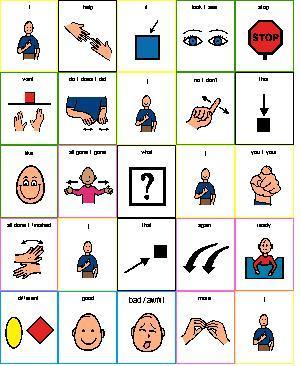
The actors came to the camp for a reason - because they were interested in theatre and wanted to perform. The rehearsal and the performance were times to take on a role, to deliver the lines and to tell a story. It can be tricky to do this in a timely manner, particularly for actors who use alternative access to a device. The play lines were set up to make access as easy as possible - perhaps just having one line of the play on a page, automatically linking to the next line on the next page. The important part was to make sure the actors had fun performing in the play - this was not the time to be practicing access. In between rehearsals the actor's typical access and communication page set up was restored to allow our actors to use their regular vocabulary for 'chit chat'. In addition, core vocabulary and theatre specific vocabulary needed for the activities and games were made available in formats that the actors could use. For example core vocabulary was always available in paper-based format to be used across the whole day.

The day's events...
Each day of camp followed a bit of a routine. One play was introduced and rehearsed each day for the first three days of the week. As it's camp, there was also lots of singing and lots of games. The games and activities were all somehow related to theatre: moving around to learn stage directions ("let's go upstage", "time to move stage right"), a photo shoot on Monday in the costumes from the plays to be performed, "Original Kids Idol" in which they performed and the actors judged, learning to use facial expressions, etc.  The activities/games were also sometimes themed around whichever play was being rehearsed that day.

Sharing the fun...
At the end of each half day, each actor reviewed the day's events with the Original Kid who was helping them out. Journals were created with 2 parts: a starter sentence and choices to be selected to talk about the day:
"Today I went to..." Setting the Stage/the theatre/camp etc.
"We..." tried on costumes/sang songs/played games/told jokes/made new friends etc.
"I liked..." playing games/telling jokes/dancing/my snack etc.
"Guess what?" song we sang?/my friend's name is/my costume looks like/I saw etc."
What did you do today?"

Other actors may have wanted their daily news programmed into their device, to share when they got home. The Original Kids were trained in the basics of programming for their actor's device so that they could work with the actors to get this done.


Throughout the week, many photographs were taken to capture the spirit of the camp. The fun of trying on costumes, the freeze dance game, the reactions of the actors to the latest "Idol" offering! By performance day, all the photographs were put into a slide show, that was presented as the audience took their seats before the performance and during the intermission.


It wouldn't be the theatre without dress rehearsal....
On the fourth day of the camp, lights, music, costumes, props and sound effects were added to the rehearsal of the plays if they hadn't been added already.  All three plays were run through in preparation for the final performance!


Staging the performance...
Performance day for both camps happened on Friday.  After a final sound check, "technology prayer" and with costumes on, "Setting the Stage" began, with the 3 plays performed back to back. Our more experienced actors sat and watched their peers perform, until it was time for "On with the Show" to begin. Then the 2 groups of actors switched places and the audience enjoyed the second half of the show. The theatre was open to anyone who wanted to attend. Usually our seats were full with proud families, school staff and others who knew the actors, but often there were others who just wanted to see what was happening.

Backing it up:
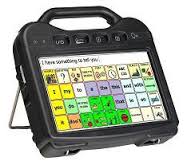
Call it stage fright, but every year, without fail, someone's device developed an attitude and refused to
co-operate. Usually it happened on dress rehearsal day, or failing that, just before our actors were about to make their entrance onto the stage! Over the years we smartened up considerably, to ensure that we had a back-up ready and waiting throughout the week. Vocabulary back-ups were made, devices were borrowed, shared or alternatives found, just to be sure that our actors would have a voice on the big day. We also brought a tool kit, mounting equipment, visual schedules, core vocabulary boards and anything else that we could think of, with the thought that the one thing that we didn't bring, would likely be the one thing we needed.

Incidentals....
Some of our actors appreciated having a place to stretch out or do some personal 'primping'.  We had a separate room available at the theatre location where the actors could have some privacy if they wanted it. We also arranged for a portable lift and change table for those who needed to use it.  We also made sure that we had our first aid kits and emergency procedures in place...just in case!

Take a bow...
Once the curtain fell and the theatre was dark again, clinicians from ACS met with the coordinator from the theatre and discussed how things went during that year's camps.  What went well? What could we change for the following year? OK......Bravo, Brava......let's start planning for the next year's camp!!!!







Monday, 2 February 2015

I Can - share my stuff with you!

In our busy lives, the days fly by too quickly and leave us little time to get to everything on our "to do" list. We have great ideas about resources that we want to develop, communication boards we want to make, visual schedules that could be helpful. We all too frequently hear ourselves saying "When am I going to get that done?". We could all use a little help. The good news is that there are lots of resources out there that may work for our students. The trick is knowing where to find them. 

Here are just a few places to start: some you may know,
others may be a new "find".

Host a "show and share"
If you belong to a parent group or have regular staff meetings at school, take a little time to share your ideas or to demonstrate what you have developed. Often getting your hands on what someone else has created will spark an idea. Hearing about what has worked well may provide some inspiration to try something different. For example, trying to describe how an encoded eye gaze system works is very different to seeing it in action. 

Plan a "make it and take it" day / morning / hour!
Take turns with colleagues or friends to organize a time when you can come together to create resources. Find a time that you can meet, with all the items that you are going to need (e.g. Boardmaker, printer, cardstock, scissors, laminator...) and share those great ideas for creating items for a student or a whole class. If you need help, contact your Communicative Disorders Assistant, Speech Language Pathologist or Occupational Therapist to see if they can join the group. Sometimes having a scheduled time set aside can make these things happen. 

I Can Share My Time
Wish you could spend more with your students who use AAC, showing them where their new messages are located? 
Wish you could give them lots of chances to use their messages over and over again (practice makes perfect)? 
Wish you had more time to make individualized activities?
Wish you could get those news messages recorded everyday? 
If you have buddies who like to come down to the classroom and spend time with your students, make the most of their time and show them how to do some of the things that you wish you had more time to do!!! They will get value out of the opportunity to help and make a difference, your load will be lightened, and your student who uses AAC will be further ahead too!


Find the communication board that you need for that upcoming activity:
These days it is so much easier to create personalized communication boards for our students to use during classroom activities. But creating boards still takes time. There are lots of places on the internet where people now share their boards, and many are related to common classroom activities. Check out some of the following:

Praactical AAC shared some great ideas this week for making language visible and available to everyone. Simply stated: "To teach AAC, be a speaker of AAC".

Sharing on the Smart Board:
Need a core board that everyone in the classroom can share? Talk to your AAC clinician about how to display a core board on your Smartboard.  Students are highly motivated to come up and use the symbols on the Smartboard. What a great opportunity for everyone to be communicating the same way!


Speaking of Speech - an interactive online forum for speech language pathologists and teachers who are interested in helping students improve their communication skills. The site has a wonderful Materials Exchange section, where free materials are available, organized by topic. Here you will find communication displays for singing about Itsy Bitsy Spider,  printable Yes/No cards, Topic Setting Boards and much, much more. And that's just in the AAC section! Lots of boards, all ready to use. 

Boardmaker Community
Create an account (free!) to get started, then browse through the thousands of activities that are available for downloading. For example, searching for "The Gingerbread Man" brings up almost 300 results so chances are, if your class is reading this book, there will be something you can use here.

 
If you have created something in Boardmaker that has worked well for your student, someone else might find it helpful too. Consider uploading your activity so that others will benefit from your efforts. 

SET-BC boards - this link has visual supports and communication displays for a variety of categories. Print out a PDF board that will work for you, or browse the topics to get some ideas for your own boards. There's also a searchable database where you can find, download and further customize technology-based content.  It also has a collection of free, teacher created accessible books in a variety of formats such as Clicker 6, Writing with Symbols, PDF, Powerpoint and Boardmaker. 

Looking for a classroom activity that will be fun for your students who use AAC strategies? Check out Remarkable Ideas on the Ablenet website. 


SymbolWorld is a customizable symbol-based website (Widgit symbols only) created for symbol users. It has material for all ages and includes news, personal contributions, stories and learning materials. If you create an account (free) you can print out a PDF of the symbol articles.


Take advantage of what others have shared to get things started for one of your students.  Check out these websites for some ready made page sets for high tech devices:

  • Page Set Central is an exchange site for Communicator 4, Communicator 5, Compass, Snap Core First and SymbolMate page sets
  • Find and Share resources for the Grid 2 and Grid 3 at Online Grids.

Simplified Technology for Communication, Living and Learning - Linda Burkhart shares her expertise in her dozens of posted handouts. Here you'll find tons of practical ideas that include no-tech, light-tech and high tech setups.

The wonderful world of PVC!!!  Polyvinyl chloride is a fabulous material for making inexpensive mounts and stands so that we don't need 3 sets of hands to get the job done! There are so many things that you can use PVC for and some creative minds have put them all together in Practical, Versatile, Cheap Assistive Technology Supports. This booklet includes a suggested 'toolkit' of different tools and PVC parts that are useful to have on hand for your creations, instructions on how to work with the material, and designs/templates for many different setups. 

Resources:
Many Children's Treatment Centres and other organizations have their own links to helpful resources. Check their websites and look at the information listed for each AAC department. You can find the TVCC handouts here and online training modules here.  Another great example is the KidsAbility in Ontario. Their Augmentative Communication Service has a link to resources which are well worth checking out.


Tuesday, 1 January 2008

I can...perform!

Lights, camera, action…kids love to perform! There are many ways for kids with disabilities to get involved in singing, dancing and acting opportunities at school.

Here are some ideas for vocabulary for your student when performing:
Let’s sing…
I want to wear….for a costume
I want to be….character
From the top!
Action!
Sing it louder!
Cut
Please help me move (stage left/right)
One more time
Take a bow
No autographs please
Let’s listen to music
Break a leg
I want to play….instrument
Was I good?


SING!
  • Kids can participate by making choices between songs or even choosing which verse will be next. 
  • Song boards provide visual support through symbols and pictures.  This allows students to actively participate in the song.  They can be created for songs you use in your classroom.  There are also some ready-made song boards for younger students.
 ACT!
  • By recording lines on a voice output communication aid (VOCA) kids can say their lines in a play. 
  • When performing, timing is very important to the flow of the play.  It should be as easy as possible for kids to access their device – consider this when customizing the messages on a device. 
  • A student may use a different access method or page set up while acting.  Some kids will need some extra help from a partner who can help them know when it’s their turn to say their line. Try colour-coding lines to make prompting easier.
DANCE! Kids in wheelchairs can be included in dancing and performing with a little help from their peers.  See the story of Rebecca Beayni for inspiration.  http://www.rebeccabeayni.com/RevelintheLight.html


No-Tech Ideas
  • Writing a Play – Try adapting a favourite story into a play.  Choose a story with enough characters for your students.  Try to ensure that all participants have a fairly equal number of lines to say. 

Light Tech Ideas
  • Every play needs sound effects! Record different effects onto single message devices for use throughout the play.
  • The first line of a song or a chorus can be recorded onto a single message device – the student decides when the singing begins.


High Tech Ideas
  • If your student uses scanning, try to program the device to link between pages to speed up access to lines.
  • Be sure to test the volume and clarity of the device in the room the play will be performed.
  • Devices with recorded speech are often easier to understand in a play.  It also allows for added expression when recording the lines.
  • If your student has a high tech device, they may be able to use the device to sing a song. 
 Resources for teachers and educators:

Check out the following websites for great ideas:
  • Songs for Kids http://www.kididdles.com/
  • For help programming a song using a Dynavox product enter in the word “singing” into their Knowledge Base