Showing posts with label accessible. Show all posts

Monday, 1 February 2016

I can ... switch it up!

Switches can be used to allow kids with physical disabilities to participate in a variety of activities.  Sometimes it's hard to know where to look for new and interesting activities that will keep your students excited about using their switch(es). This month's blog contains some resources and places to find ways for your child/student to practice using their switch(es), so that they may become more efficient and independent with them.  

How do switches work on the computer?

Switches can be used to cause an action within an activity (i.e. cause and effect) or to move between a set of available options and to select the desired choice (i.e. scanning).  If the student is using one switch, then the choices are automatically highlighted in a timed sequence and when the desired object is highlighted, the student must activate their switch to make a selection.  If the student is using two switches, they can move between the choices by activating one of their switches, and select the desired option by activating their second switch. 

In order for the switches to 'communicate' with the computer, they need to be plugged into some kind of interface.  Sometimes the activity is looking for a left mouse-click to perform an action.  In this case, a switch-adapted mouse will do the trick! If the software is looking for a different type of input (usually a keystroke of some kind) then a more sophisticated switch interface may be needed, e.g. a Hitch 2, or a Crick USB Switch Interface.

For more information about switches and scanning, have a look at our previous posts, I Can...Find the Right Switch, I Can...Use 2 Switches and I Can....Use My Switch 

Are there switch-accessible activities online?

Senict Software has some free 'lite' cause and effect activities for members. You can purchase a subscription that will unlock additional features on these activities. Cause and effect activities include Door Step Ding Dong, Vehicles, Shapes, Meet the Aliens, Happy Shapes, and Flutterby.  The error-free Happy Shapes Choosing activity allows your student to choose which shapes he wants to 'dance' around the screen by using 2-switches....1 switch to move to the desired shape, and the second switch to choose the shape.  Older students may enjoy hanging out with James Bond, or singing along with the Beatles or Justin Bieber!!!


HelpKidzLearn (HKL) 
Fun games, activities & tools designed specifically for young children and those with learning difficulties.  Students can interact with these activities using a single switch and some of the activities allow 2-switch access as well.  When you register on their site, you get access to 10 free activities - 2 in each of the categories of Early Years, Games, Stories, Creative, and Find Out.  With a subscription, you get access to all of the available activities. Also through the HKL website, you can subscribe to the ChooseIt Maker 3 online software.  Here you can create, edit and play personalized learning activities that can be used online or on your iPad or Android tablet!

Teacheing Learners with Multiple Special Needs
This is a list of free online switch activities for learner with multiple or significant special needs. The list was updated in the fall of 2015.  The activities are simple and enjoyable and the categories include:  Cause and Effect (and Press to Play), Single Switch Scanning/Timed Single Switch Response and Two Switches.


Home
Ginger Tiger is designed and tailor-made for learners with a physical disability, sensory impairment or learning difficulty.  It's accessible on many different platforms (iPad, Android tablets, Win 8 tablets etc.) and via different access methods (Switches, Eye Gaze, Touch screens, keyboards etc.). You can sign-up for a free one-week trial or purchase an annual subscription for full access to the activities.  

Have a look at One Switch from the UK.  In addition to lots of games, they also have resources related to making other games, music and art accessible via switches.

Glenda's Assistive Technology and More... has loads of links to online and iOS activities that can be used with switches.  She also provides links to companies who sell switches, toys and environmental controls.  In addition, you can find other resources for your student who is using switches.  She introduces how to use an iPad for cause and effect switch activities and suggests getting more switch control via software that is meant to be switch accessible.

With Accessible YouTube, switch users can control YouTube videos!!! Plugging their switch into a switch interface that sends keyboard equivalents to the computer (e.g. Don Johnson Switch interface), students can move between video options and choose the one they want to watch.  Once a video is playing, they can pause, rewind, watch related videos, or go back to the main list of videos that they started from. Imagine the control!! Be aware that this site does not filter any of the search results (input initially by someone who can type in the search) and that the suitability of the content may need to be monitored by an adult.

We've all heard of Angry Birds, right?  Well, check out the Angry Pig Switch Game at Special Bites!  Here you can use your switch to catapult the angry pig and explode as many bombs as you can.  See if you can work your way through all 4 levels of the game!!! If Angry Pigs aren't your thing, not to worry!  There are sports and seasonal switch games here as well!

Shiny Learning has games that encompass cause and effect, targeting, visual tracking, timing, switch skills, touch skills and more.  You can trial free versions of the games online for 7 days.  If you like them after you try them out, you can purchase them so that you can play them offline as well.

Priory Woods School and Arts College offers more than 60 musical videos that your student can start and re-start using their single switch.  The videos cross a range of interests from classic movie themes, current pop and the one you just can't out of your head....the animated characters from the Madagascar movie dancing to the song "I Like to Move It!".  These videos are super engaging for early switch users and are designed to help children understand and generalize cause and effect. The videos can be played online or downloaded for use on a PC or Macintosh computer.

Let's use our switches to read!!!   

Tar Heel Reader has a collection of free, easy-to-read, and accessible books on a wide range of topics.  Each book can be speech enabled and accessed using multiple interfaces, including touch screens, the IntelliKeys, and 1 to 3 switches. You can even write your own books here and publish them to the website!

Tar Heel Gameplay is a new site with free, easy to play games everyone can play. The games are made from YouTube videos and are accessible using 1-3 switches, mouse or touch screens. You can even create your own games from You Tube videos, using either a Basic, Precise or Advanced creator, depending on how complex you want your game to be. Note that Tar Heel Gameplay is being developed and tested in the Google Chrome browser - this is the recommended browser for its use.


Tumblebooks is an online library of children's books.  Although this website is not specifically for switch users, books can be accessed with a switch by placing the mouse cursor over the 'turn the page' button and ensuring that the mode is set to manual.  Your community may have a subscription...check out your local library's website to see if you can access Tumblebooks using your library card.  You can see a free preview of how Tumblebooks works here.


My Own Books 2 Go was developed by SLP Pati King-DeBaun and has more than 200 'easy to read' books. Students who use switches can control the book reading.  The books can be read aloud by the computer and shared via email.  Students can also become authors and create their own books to read on their own or share with others.  

Marblesoft Simtech sells lots of different switch accessible software and if you're looking for something with more switch-scanning features than what's available in the online activities listed above, you may find it here.

What about software that's already available at my school (in Ontario)??? 
 
Clicker is a powerful yet easy-to-use writing support and multimedia tool that enables children to write with whole words, phrases or pictures. Clicker activities can be customized to meet the access (e.g. switch access) and layout needs of the student.

Clicker Paint is an easy-to-use paint program that enables your student to illustrate talking books, do some writing, colouring or drawing activities......all with their switch! Talk to your teachers/clinicians to see if it makes sense to be using these programs with your child. 

Want more info about the skills involved in learning to use a switch?

Download this Switch Progression Road Map from Inclusive Technology.  It details the stages of switch skill acquisition from cause and effect to confident scanning.  It can help you determine where to start when using a switch with a student and to set goals for progression toward more independent scanning.


Do we always have to practice switches on the computer? 

The answer here is "No"....any time your student gets to use their switches, they are practicing the thoughts and movements that are required to activate the switch and becoming more familiar with how the switch works. There are many commercially available products that are switch accessible. Here are some websites to check out:
Enabling Devices
Adaptive Tech Solutions
Special Needs Toys


Ablenet has lots of ideas and products related to switch use. For example, the Switch Activated All Turn It Spinner is a great tool that enables random selections for game playing. You can create overlays for the spinner which makes this device useful for all kinds of activities. 


Want to try out some switches or an interface? Many Children's Treatment Centres have equipment loan pools where you may be able to borrow an item to see how it really works. Check in with your child's Occupational Therapist. For example, at TVCC in London, Ontario, there are a variety of switches, switch mounts, switch interfaces and switch adapted toys that can be borrowed by TVCC clients.  Contact your TVCC clinician for details if you are interested.


Friday, 5 September 2014

I Can... Speak Up and Be Heard!


All too often, we take daily activities like ordering a coffee, shopping for groceries, reserving a taxi or calling to make a doctor's appointment for granted.  For the thousands of Canadians with communication disabilities, these are all tasks that may present significant barriers that need to be overcome.  There is a campaign across Canada to promote communication accessibility for those who have speech and language disabilities. In this issue, we will highlight some of the work that is being done by Communication Access Now (CAN) and how you can get involved. 


People who use AAC have the right to access goods and services (including essential services like police, health care and legal) in the same way as everyone else.  CAN's goal is to improve accessibility to goods and services, and to open up opportunities for all people who have speech and language disabilities.  It is operated by Communication Disabilities Access Canada (CDAC).

What are some of the barriers?
Too often, people who have speech and language disabilities experience major challenges in receiving appropriate goods and services because those who are providing the services:   
  • May be afraid to talk to them
  • May think they are hard of hearing
  • May underestimate their abilities
  • May not know how to communicate with them
  • May not do simple things to provide access to services 


CAN provides information, education and resources related to communication access for: 
- Government, accessibility legislators and policy makers.
- Businesses, organizations and community services.
- People who have speech and language disabilities and their families.


Communication Access Symbol 
Have you seen this symbol around? Do you want to know what it is all about? 
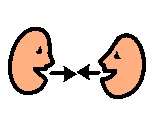
The communication access symbol highlights the features of effective communication. Everyone benefits from effective communication, including people who have speech and language disabilities. The communication access symbol shows that communication:
  • Involves two people 
  • Is about interaction
  • Is about giving as well as receiving information
  • Is about listening and watching
Communication access means that people can:
  • Understand what you are saying 
  • Have you understand their messages 
  • Use the communication methods that work best for them such as speech, gestures, writing, pointing to objects or pictures, spelling words, typing on a communication device or human assistance
  • Read and understand your written information
  • Sign documents and complete forms in ways that are accessible for them

Six Things to Know about Communication Access:
  1. Communication access is good for everyone, including people who have speech and language disabilities.
  2. Organizations are legally obliged to provide accessible services including accessible communication.
  3. Access is more than getting into a building or having documents in alternate formats. It is also about how people interact, understand and express their thoughts. 
  4. Businesses and organizations can do simple things so that customers, patients and clients can communicate effectively with them.
  5. Lack of effective communication can result in serious consequences, especially in essential health, legal and justice services.
  6. In critical communication services, communication access means having protocols, staff training, communication assistance services and communication tools.

Join the discussion on Facebook 
https://www.facebook.com/pages/Communication-Disabilities-Access-Canada/167031386664276 


I Can.....Move on to New Challenges!

 
“Too often we underestimate the power of a touch, a smile, a kind word, a listening ear, an honest compliment, or the smallest act of caring, all of which have the potential to turn a life around.” 

Leo Buscaglia


We would like to extend our gratitude and heartfelt thanks to someone who has touched the lives of many of our children and families in the Augmentative Communication Service here at Thames Valley Children's Centre. Kristel Pallant is an Occupational Therapist who worked in ACS for many years. Kristel was one of the original team who started the I Can Blog (back then a humble newsletter!) back in May 2007, and worked tirelessly to move it into a blog format. This June, Kristel decided to take on some new challenges in another position at the Centre. We miss her in Augmentative Communication, but wish Kristel the best of luck in her new adventures! 

Lights, Camera, Action!!!
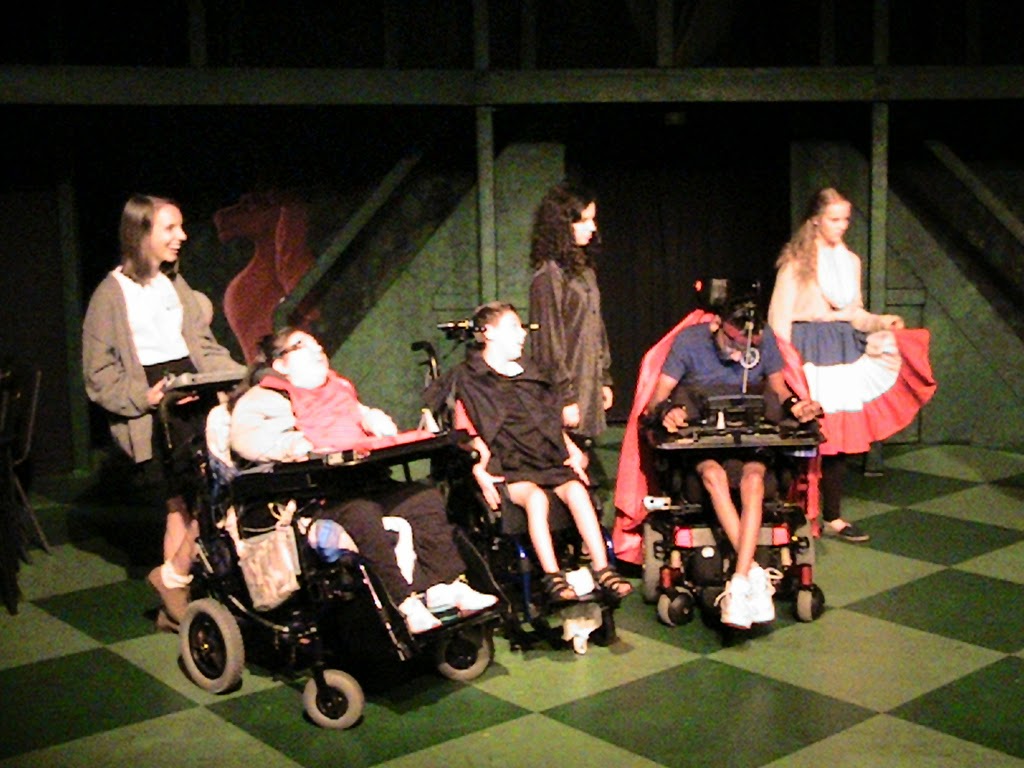
On August 29 2014, a dynamic group of actors hit the stage and performed 6 different plays at the Spriet Family Theatre in London, Ontario. The TVCC actors, together with volunteers from Original Kids Theatre Company, performed the plays they had been rehearsing all week, using their speech generating devices to deliver their lines. Everybody was very excited to show his or her skills in acting and performing. It was an amazing show!!! 


Thursday, 1 November 2012

I can...access the curriculum!

In school, our children learn specific information as outlined in an agreed-upon provincial curriculum. For those students who use, or who are learning to use, alternative and augmentative communication (AAC), additional support or resources may be required to enable them to meet curriculum goals. This month we explore some information around what curriculum looks like, how we know what goals our students are working towards and how to best support them to learn in school. 


What does the Ontario Curriculum look like?

You can explore the Ontario Curriculum by Grade or by subject on the following website:  
http://www.edu.gov.on.ca/eng/curriculum/elementary/


Who can help me understand how my child will access the curriculum?
Your child is supported in school by a team of people who can work with you, to help develop the goals he or she is working towards. Your child's teacher or the school's Learning Support Teacher can help guide you in developing goals with an individual educational plan (IEP).

What can I do to help my child reach their goals?
  • Be familiar with your student's vocabulary and the location of their words/symbols so that you can quickly and easily model the use of their language with them.
    • With the student's permission, post a larger sized version of their communication display on a classroom wall or on a wall at home.
    • Have a duplicate communication display that you can use when you are talking with your child.

    • Encourage other classmates, teachers or family members to gain familiarity with your child's communication system so that they can model too.  If you'd like to host an AC awareness event with the students in your class, please speak with your TVCC ACS clinician.
    • Download your student's SGD software onto a computer, so that you can explore it without having to take the SGD away from them.
  • Look for opportunites for communication. 
    • Respond to ALL your student's communication attempts to ensure that they don't become passive, always waiting for a prompt to communicate.  For example: "I hear that you'd like to go outside, but right now it's snack time. Tell me what you want next for snack."
  • Rephrase questions to allow students to use their core vocabulary
    • Instead of asking the child to name the main characater in a book, ask them to use 3 words to describe the main character.  Describing words have meaning across different topics and will be used more frequently than specific vocabulary.
    • Consider which core words to focus on, based on the subjects being studied in class. Get information from your child's teacher about current topics in the classroom. Think about the words that you want to focus on with your child during that topic - select those words which your child can use time and time again. For example, "refraction" and "reflection" are very specific, but we can talk about "light", "dark", "move", "bounce", "on" and "off", across many activities.
Communication and Educational Goals
  • Educational goals often involve measuring a student's knowledge. Communication goals focus on improving an exchange between two or more people. Regardless of whether the child answers correctly, a communication exchange may occur. When writing goals, consider if the goal is educational or communication based. 
  • Here is a great example from Burkhart and Porter (ISAAC 2012) Assessing During Instruction: Measuring REAL Success for Communication: Goal: During math activities "Student" will respond to the question: How many? when presented with a group of 1-10 items. If the student answers with an incorrect number, then the student has met the communication component of the goal (respond to the question) but has not met the criteria for the content of this goal (understanding quantities).

Augmentative Communication and Language Goals
The student who is non-verbal and learning to use an AAC system needs goals related to communication and language development.  We need to teach children how to use vocabulary to participate throughout their day.   There are many different aspects to this overall goal including receptive understanding of symbols or words, expressive use of the symbols, familiarity with vocabulary organization and categorization, active participation, use of core words, message construction (letter by letter, symbol combination etc.). 

Receptive and Expressive Use of Symbols: Have you ever looked a symbol and wondered - if the written label wasn't there, would I know what this meant?  Modelling the use of symbols with a child's existing system helps teach what the word means and how it could be used to express a message.
  • Possible Goal: "Student" will visually attend to the symbols modeled 70% of the time.  
Vocabulary Organization and Categorization: Kids need to be able to find the vocabulary in their communication systems, especially as the volume of words increases.  Understanding categorization can greatly improve a student's ability to get to the words he/she needs in a timely manner.  
  • Possible Goal:  "Student" will locate 3 reading words on his/her communication system during reading time, without prompting.
  • Possible Goal: "Student" will be able to locate the food category during snack to request which snack he/she wants.
Active Participation: Having your student increase the number of time he/she communicates in activities throughout the day provides them with the opportunity to engage with others. 
  • Possible Goal:  "Student" will communicate during circle time, snack time, language and book reading on a daily basis. 
Bank of IEP Goals for Augmentative Communication:
Check out this link of a bank of IEP goals: http://www.speakingofspeech.com/IEP_Goal_Bank.html#AAC

AAC Curriculum:  This curriculum outlines specific goals for high school students who use AAC to gain credit for achieving competency in the use of their SGD.  Check out some of the goals outlined in the program under Curriculum Rubric. http://setbc.org/setbc/communication/aac_curriculum_outline.html

AC Literacy Tools and Resources
Being able to spell opens the world to people who use AC.  It allows them to say what they want to say in the way they want to say it.  Children who use AC and who need adapted access will need different resources to achieve this goal.  Here are some examples:

Alternative Pencil: This is a method to allow kids to explore writing by choosing letters and having a caregiver scribe them.  The focus is then on the exploration of letters, sounds and combination of letters into "words".  Check out this great initiative about the use of alternative pencils: http://sda.doe.louisiana.gov/Lists/Literacy/DispForm.aspx?ID=12

Adapted Literacy Programs:  There are a variety of literacy programs designed for students who use AC.  Check out some of these valuable resources
I can...be a STAR!

Remember Duncan?  We featured him in the June 2011 issue, I can...keep on talking!  He's now successfully achieved 3 high school credits in the AAC Curriculum including:
Unit 1 - Initiating and Responding
Unit 2 - Communicating with Familiar Partners and in Familiar Environments
Unit 3 - Communicating with Unfamiliar Partners and in Unfamiliar Environments

Way to go Duncan!!!!
Resources:
Please Note: The link from the AAC Institute regarding IEP meetings has been removed.  It represented a parent's viewpoint from an American setting. The views expressed  were solely those of the author and do not in any way represent everyone's experience or the views of Thames Valley Children's Centre.
We regret any misunderstandings the information may have caused.
 

Monday, 1 October 2012

I can...take 5!

September has gone by in the blink of an eye.  We are all so busy that it's difficult get through everything on our "to do" lists. In our September haze, we forgot to send out the notice that the blog was posted! Eeek! In this issue, we will look at quick and easy ways to "take 5" to make a difference in your students' lives.  Think about what you could achieve by introducing 5 new strategies, 5 core words or by spending 5 minutes brainstorming new vocabulary.  Every journey begins with a first step.


We asked the TVCC ACS clinicians to share some of their "Top 5" AAC tips with all of you.  Here's a selection of their comments:

Top AAC Strategies:
  • model symbol use, especially core words
  • look for opportunities for your child to communicate
  • share how your child communicates with others
  • tell your child what you think they are communicating and why
  • brag about your child's ability to communicate (within earshot)
  • Make sure the communication system is always available, " See child, see book/device" Linda Burkhart and Gayle Porter (Partner assisted communication strategies for children who face multiple challenges)
  • Believe in your child
  • Create a communication dictionary listing all of your child's communication behaviours and how to respond.
  • Include your child in conversations that are about him/her.
  • Encourage people to communicate with the child using AC rather than the adult or person with them.

If you have 5 minutes:
  • set up your child's communication system
  • plan opportunities in the day for your child to communicate
  • provide an opportunity for your child to make choices
  • ask a question or learn something new by looking online or in a book
  • read to your child
  • use no tech strategies to make choices 
  • co-construct a message to put on a single message device
  • model core words
  • play a game to encourage fun use of vocab or literacy
    • I'm thinking of a word that rhymes with door; Guess "more", four", "store"
    • I Spy things that start with the "b" sound....
  • help your child practice a conversational routine to use with the next person who comes into the room.
  • have your child share some news to/from home/school by programming a message in their SGD

  • model real-life writing with child e.g. "Look Suzie, we need some ice cream so mommy is going to put that on her shopping list" 
Top words....here are some of the first words that our AC clinicians introduce

                             more                       all done
                             want                        like
                             not                          stop
                             eat                          drink
                             go                           help

Top FAQ questions about AAC


  • Will using AAC stop my child from talking or writing? 
    • In fact, numerous studies have found that the introduction of AAC frequently has a positive affect on speech; children who are given AAC often develop speech faster than they would have otherwise (Bodine & Beukelman, 1991; Van Tatenhove, 1987).
     
  • How can I get an iPad? Can we do this on an iPad?
    • We love iPads!!!  However, they may not work well for everyone.  Check out our past issue all about iPads for more information: I can...get connected!
  • What is the best way to use the device? 
    • Every child is unique and has different things he or she may want to communicate. Gather information about your child's interests and consider his/her motivators. 
  • Why do we need to use AAC at home if we know what they want to say/do?
    • Each time you shape your child's communication, you are paving the road to successful communication with their teachers, friends, and others.
  • How do I find out what my child understands?
    Connect with your child's teacher and therapists.  You may want to consider having a psycho-educational testing if you are having difficulty figuring out your child's learning strengths.
  • I"m not comfortable with computers/technology, do I have to program it? 
    • If your child is an ACS TVCC client, contact your clinicians if you need additional support.  There is also a variety on online resources to help you become more comfortable.   
  • What if child doesn't have strong preferences - how will we motive child to communicate? Shouldn't we start with requesting to go to the bathroom?
    • Make a list of your child's favourite toys, foods and activities.  Your child may not be motivated to communicate his/her bathroom needs.  

 Top AAC related websites:


AAC Awareness Month 
Check out these great ideas to celebrate AAC Awareness Month on this blogspot: 


Tuesday, 4 September 2012

I can...learn online!


What a great summer it has been...the Olympics, fantastic weather, ISAAC conference and so much more!  We hope you have made some great memories and that your child is looking forward to seeing classmates and learning something new this year. With that in mind, if you feel like you'd like a refresher on supporting your child's use of an augmentative communication system here are some online resources that may help.


 Speech Generating Device (SGD) Training Resources: 
Many device manufacturers provide some online training that is often FREE!  If you're child's device is connected via wifi...you may be able to search for the answers right on the device.  Bookmark your child's SGD manufacturer's website for quick and easy access. Here are some examples of SGD online resources. 


Dynavox - Webinars related to Boardmaker and Dynavox products such as V, Maestro, VMax.


PRC - Webinars related to PRC products such as the Springboard Lite, Echo, Vantage Lite.


 Proloquo2Go - Webinars for current and previous versions of this iDevice app.


If your child or student is a TVCC ACS client and you'd like specific training related to a device or communication system, speak with your clinician(s) to arrange a date and time.

Assistive Technology Training Resources: 
Do you want to learn more about assistive technology in general or have a particular area you'd like to learn more about.  Be sure to check out these online webinars and fantastic resources.

ATIA (Assistive Technology Industry Association) hosts a variety of live and on demand AAC webinars.

ATIA On Demand Webinar Topics: 
  1. Teaching Core Vocabulary to Students with Severe Intellectual Disabilities 
  2. Core Vocabulary: Why Use It?
  3. Implementing Activity-Based Learning Using Core Vocabulary with Students using AAC Systems
  4. Apps for the iPad, iTouch, & iPhone on Alternative and Augmentative Communication


Keyboarding: Learning to type can be fun!  If your child is interested in learning about keyboarding, here are some programs that are available online:


Dance Mat Typing 

Good Typing
In this program you can increase the size of the copy text.

Power Typing
Great for kids who can handle several lines of text presented at once.

If you are thinking of purchasing a keyboarding instruction program, check out this review online:http://superkids.com/aweb/pages/reviews/typing/


General AAC Information: 


Pinterest - Check out the latest "pins" by searching augmentative communication, speech generating device, aac, communication symbols.
 
Twitter - keep your finger on the pulse with the latest tweets about AAC by following your favourite AC manufacturers and those interested in AC...including us!  If you'd like to follow us, click the link below.


YouTube - Search particular devices or augmentative communication in general.  You'll be sure to find a wide variety of interesting videos.  Supervision is a must on this site.


I can...be a STAR!

Terrell shows his ability to use his low tech communication display to spell words and use core words to communicate with others.  Way to go Terrell!


Here's a great example of taking AAC strategies and using them no matter where you are.  If you need a smile and some inspiration about the everyday use of AAC, check out this fantastic blog: Neider Family Blog


Wednesday, 1 April 2009

I can... read and write

Why is literacy development important?
Research suggests that no more than 10 % of individuals who use AAC can read with comprehension above a grade 2 level (Erikson, 2003). The good news is that there are now many research based strategies that can be used to teach these individuals to read and write. There’s lots of information out there and many things to try. 

Learning about Letters

Children learn about the alphabet and how to use letters and sounds for reading and writing by actively playing with those letters and sounds in a wide range of activities, with lots of repetition. These activities include manipulating books (picking them out, holding the book, turning the pages, learning top, bottom, front and back, pointing to pictures and words) listening to stories, scribbling, saying rhymes, singing songs and identifying symbols (e.g. pointing out the McDonalds sign as you drive by). Gretchen Hanser, an expert in the field of AAC, states that “Typical emergent writers and readers have hundreds of hours of exposure to the alphabet before they are expected to name and know letters”. Individuals who use AAC often have limited opportunities to do so for a variety of reasons (time being spent meeting physical needs rather than engaging in literacy-based activities, difficulty manipulating books and toys etc.). This newsletter will provide some ideas for exposing individuals who use AAC to the alphabet and print, and increasing their participation in literacy-based activities.  

Give your child lots of practice putting letters together by making a Print Alphabet Flip Chart. This can include a write on / wipe off surface or a pad of paper (allows you to keep the written information produced over time) for the written output, with an arrangement of alphabet letters that the child can select on flip sheets. If needed, the child may select letters through partner assisted scanning. A template for this and other “alternative pencils” can be purchased. www.telability.org/handouts/1-AlternativePencilsOrderForm.pdf 

Jake’s story gives an example of progress with literacy strategies such as using the alphabet flip chart.
http://www.med.unc.edu/ahs/clds/projects/deaf-blind-model-classroom/jakes-story?searchterm=print+alphabet+flip+chart

No-Tech Ideas

  • Your child can create a simple story by selecting between symbols or phrases for each of a beginning, middle and an end.

Light Tech Ideas

  • Let you child be a storyteller. Record the story that your child has created onto a Step-by-Step™, so that he /she can read it over and over to different partners.   

High Tech Ideas

  • Children can also use computers and some speech-generating devices to explore books.  Here are some examples.


Resources:
My Own Bookshelf – software that allows you to create simple electronic books.  These books can be accessed on the computer via a mouse, IntelliKeys keyboard or switches and scanning.  http://www.bridges-canada.com/Product/ProductDisp.aspx?id=398&Search=my+own+bookshelf

Tar Heel Reader - a collection of free, easy-to-read, accessible books on a wide range of topics (all ages). Also allows you to create your own books using pictures from the collection or by uploading your own images. http://tarheelreader.org/

Websites for Adapted/Adapting Books (You will need the corresponding software in order to view and print these symbols.)

This website has Boardmaker symbol resources for adapting a range of children’s books.  http://www.bcps.k12.md.us/boardmaker/adapted_library.asp

Bookshare for Canada. – check out this new site where members can access a large collection of accessible books http://bookshare.org/home?c=ca

Download books from the Internet and read them aloud using speech-generating devices such as the Dynavox VMax. This device supports the use of electronic books (eBooks). Users can also create a customized eBook reader page to suit their own design requirements using the provided tools. http://www.dynavoxtech.com/products/v/

Star Fall: activities to teach children to read. Perfect for early grades. Contains exciting interactive books and phonics games. http://www.starfall.com